Product version 5.17.1
Every module, in detail
Ten operational areas, all working off the same student, employee and financial records. This is the full list, not a summary.
School setup, campuses and SaaS control
Configure the operational structure once, then every dependent screen inherits the right campus, class, section, academic year and subscription rules.
School identity and documents
- School profile: name, address, phone, logo and letterhead used on vouchers
- Configurable numbering prefixes for admissions, vouchers, receipts, teachers and staff
- Academic years with date ranges and year-closing controls
- Campus-linked sessions and shifts feeding admission, attendance and HR
Multi-campus structure
- One class level offered at several campuses without duplicate names
- Sections added under a chosen class and grouped beneath it
- Class sequence controls ordering across admission and reporting screens
- Selecting a campus at the top constrains every dependent filter
Subscription administration
- Independent feature switches for portals, payroll, question papers, award sheets and migration
- Reusable module bundles with pricing, student limits and per-student charging
- Expired subscriptions revoke sessions and return users to login
- Owner dashboard tracking active, expiring, expired and inactive schools
A disabled feature is removed from navigation, APIs and settings, not merely hidden on screen.
Admissions, students and families
A one-time admission register feeds the permanent student record while preserving the original admission snapshot for audit.

Guided admission
- Validated identity data: admission number, B-Form or CNIC, formatted phone numbers and dates
- Academic year, campus, class and section selected together, with session, shift and roll number linked
- Fee preview before saving: class heads, discounts, transport, one-time and annual charges
- First voucher generated full or prorated without blocking later monthly billing
- Guardian and student logins created automatically during admission
Permanent student records
- Edit placement, roll number, fee, discounts and active or left state without touching the admission snapshot
- The same effective fee logic drives grids, vouchers and printed documents
- Open profile, edit fee, print form PDF, reset portal access, mark as left
- Re-admit or transfer campuses without creating a duplicate student
Families and guardians
- Family code from guardian CNIC or phone as a shared sibling identity
- Duplicate prevention checks linked family details before creating another login
- One guardian login can switch between all active children when enabled
- Sibling discounts, family notifications and collective dues
Excel and CSV import covers students, classes, teachers, staff and subjects, with preview validation and row-level errors.
Classes, subjects, teachers, timetables and homework
Academic planning is bound to campus and role scope, so teachers only work with the classes and sections they are assigned.
Classes and subjects
- Each class shown once per campus with its sections underneath
- Subjects attached to classes with total and passing marks and assigned teachers
- Bulk import of classes, sections and subjects with duplicate checks
Teacher records and logins
- Profile with code, contact, qualification, salary, joining date, class-in-charge and subjects
- Username and temporary password captured when the teacher is added
- Safe permission preset excludes fee collections, payroll and other employees' HR data
- Bulk import creates teacher records and linked portal accounts together
Timetable and substitutions
- Ordered teaching periods and breaks with start and end times
- Teacher and class conflicts detected before saving, with an authorized override
- Printable class timetables and individual teacher schedules
- Select an absent teacher, review affected periods, assign substitutes
Homework
- Drafts stay invisible to parents and students until published
- Subject, teacher, dates, instructions, marks and attachments
- Portal submissions with late rules, teacher review, marks and remarks
Student attendance and staff time tracking
Student registers and employee time records use separate controls, while holidays and day-off rules stay visible in both reports and payroll.

Daily student attendance
- Present, absent or leave per student, or mark the whole class in one action
- Teachers see only assigned registers; campus selection constrains the rest
- Future dates and defined holidays cannot be marked as school days
- Printable monthly register with P/A/L/H codes and holiday names
- Monthly summaries, low-attendance identification and class-wise daily reports
Staff attendance and time
- Shift rules for check-in and check-out times, grace minutes and working weekdays
- In Now and Out Now use the server clock for a reliable timestamp
- Late minutes, overtime, worked time and half-day status calculated from saved rules
- Approved leave and public holidays appear by name rather than as unexplained absence
- Correction requests with approver decisions and payroll recalculation
A staff login sees only its own attendance history. Access to all employees needs an explicit high-risk HR permission.
Fee management, billing and legacy migration
A single fee engine drives student records, vouchers, receipts, defaulter views, dashboards and statements.
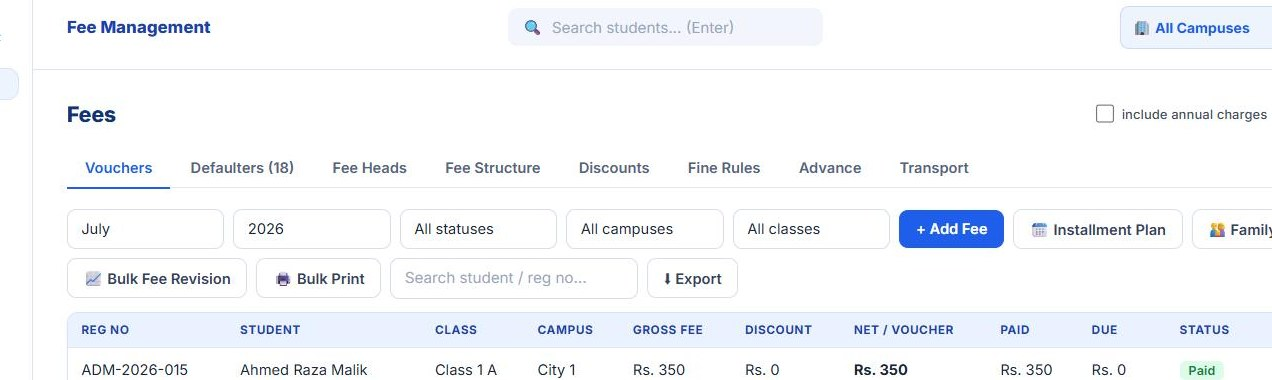
Fee setup and billing
- Monthly, one-time, annual and optional fee heads with active or inactive control
- Class fee structure, plus student custom fee and transport added separately
- Full-month or calendar-day proration for the first month
- Annual heads tracked per student and session so duplicate charging is blocked
- Percentage or fixed discounts, sibling support, scholarship and employee-child categories
- Configurable late-fee rules with auditable adjustments and waivers
Vouchers, payments and recovery
- Generate monthly vouchers, add specific charges, revise fees in bulk
- Consistent voucher number, due date, fee lines, discount, arrears, fine and payable amount in print
- Full or partial payments, printed receipts and recorded payment mode
- Family vouchers and bulk batch printing without broken page lines
- Defaulters view with current due, arrears and total due, then WhatsApp or SMS reminders
- Student advances: deposit, allocate and report balances
- Transport routes and charges billed separately
Legacy balances
- Opening-balance import for carried-forward dues at a controlled cutoff date
- Detailed history import covering old vouchers, payments, receipts and advance credit
- Batch reconciliation summaries showing imported records and totals
- Rollback blocked when later payments or allocations depend on the imported data
Students, vouchers, defaulters, print documents, dashboard cards and statements all derive from the same ledger.
Exams, question papers, award sheets and results
The workflow adapts to whether a question paper exists, without asking users to pick an artificial assessment mode.

Planning and scope
- Exams for one class and section or for the whole school
- Academic year, date, scope, total marks and an optional promotion-basis flag
- Draft marks stay editable; publishing exposes results in portals and locks them
Question paper builder
- Separate multiple-choice and subjective sections
- Each question carries marks; a paper stays draft until assigned marks match the total
- Print a single paper or every paper for an exam
Award sheets and PDF marks import
- Print a blank or prefilled subject award sheet with admission numbers
- Upload the completed PDF and extract marks by text or OCR, matched on admission number
- Human review gate for confidence, corrections and replacement decisions
- Only reviewed rows are written, with an audit event and published-result protection
Results and promotion
- Subject marks, totals, percentage, grade, status and position
- A4 landscape whole-class result sheet with pass, fail and incomplete status
- Print one report card or all of them
- Promote, repeat or review recommendations at year closing
Employees, leave, time, payroll and advances
HR policy is configured in one place and applied consistently to attendance, leave balances, deductions, payslips and expenses.
Employee records
- Codes, contact data, designation, qualification, salary, joining and leaving dates
- Private portal for own leave balance, attendance, payslips and salary history
- An assigned approver records decisions and cannot approve their own request
- HR controls which employee portal tabs and notifications are visible
Leave and encashment
- Paid, unpaid and half-day leave against configurable allowances
- Remaining balance shown while the request is being made
- Half days, holiday exclusion and optional overlap blocking
- Approved unpaid leave deducts in the same salary month
- Encashment of unused paid leave with an approver, day cap and settlement month
Payroll
- Daily rate from monthly basic divided by configured salary calculation days
- Deductions for approved unpaid leave, absences and half days
- Joining and leaving proration for mid-month employment
- Allowances, manual deductions, encashment and advance recovery
- Close a payroll month, reopen only with a recorded reason
- One protected salary payment per employee per month, with the expense generated automatically
- Printable payslips and clearance certificates
Expenses, dashboard and nineteen reports
Operational entries flow into management views without separate spreadsheets or duplicate salary and fee postings.
Income and expense
- Voucher register with number, date, category, person, amount, mode, note and operator
- Fee receipts appear as income without re-entry
- Paid payroll rows create protected expense vouchers and block duplicates
- Profit and loss across fee income, other income, advances, salary and expenses
Leadership dashboard
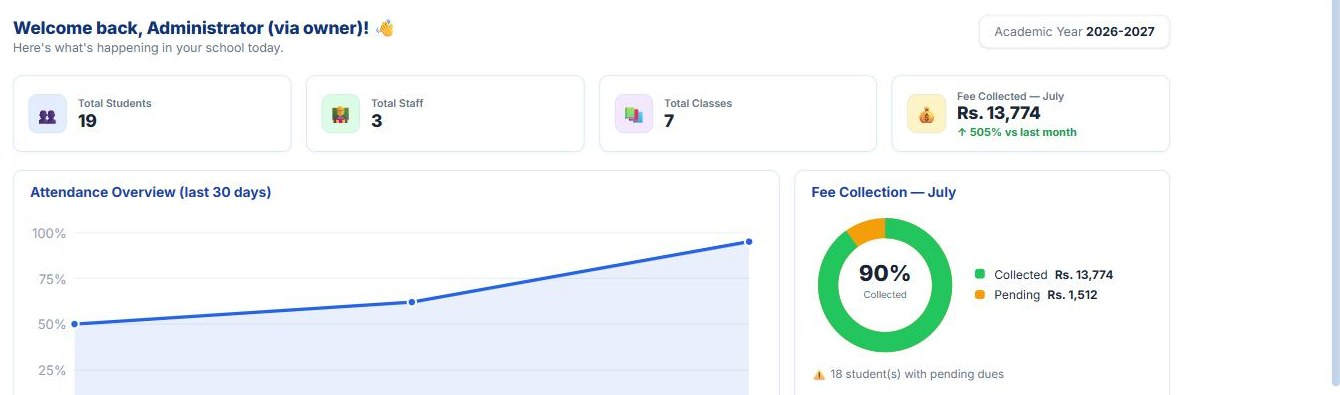
- Active students, classes, attendance, billed fees, collections, outstanding and defaulter count
- Class-wise billed against collected, pending amount and settlement percentage
- Daily attendance trend with today's present, absent and leave counts
- Enrollment mix by class and campus
Report library
- Fee collection: daily collection, day close and cash reconciliation, monthly trend, class-wise billed against collected
- Dues and concessions: outstanding by class, defaulter aging, discounts, late fines, adjustments and waivers
- Finance and payroll: salary summary and profit and loss
- Academics: student strength, class-wise daily attendance, low attendance, exam result analysis, admissions against withdrawals
- Statements: student SOA, staff SOA, school ledger
Each report can be granted separately to a role, and filters follow campus, class and section scope.
Parent, student and employee portals
Self-service access is identity-linked and enforced on the server, so each user sees only the records intended for that person or family.
Parent portal
- Child profile, class and section
- Vouchers, payment history and printable receipts
- Monthly attendance and published results only
- Homework downloads, submissions and reviewed marks
- Targeted messages with unread badges and activity history
- Optional switching between all children in the family
Student portal
- Own profile, attendance, published results, homework and notifications
- Own vouchers and payment history when the school enables it
- Password change plus administrator reset that revokes old sessions
Employee self-service
- Leave balances, applications, status, approver and decision remarks
- Attendance history, check-in and out, late and overtime, correction requests
- Payroll history, deductions, net received and printable payslips
- Pending-approval badges and audit activity for approval roles
Parent messaging, SMS and WhatsApp
Compose a notice once, preview exactly who receives it, and keep a record of what was delivered.
Traceable messaging
- Target by campus, class, section or selected students within the sender's scope
- Preview parent count, portal readiness, SMS readiness and a sample list before sending
- Send to the parent portal, by SMS, or both
- Campaign status with per-recipient delivery and read state
SMS provider integration
- Providers accepting GET query strings, JSON POST or form-encoded POST
- API URL, method, content type, sender ID, key, header and success keywords
- Placeholders map number, message, sender and key into the provider's format
- Controlled test sends recorded in SMS history
- Automated templates on voucher generation, fee payment and admission
Want to see any of this running?
Pick the two or three modules that matter most to your school and we will walk through those on the call.